Portable WiFi - Mobile Hotspot
DOSA AppsCommunication
4.42.44K Reviews
- Version
- 3.9.2
- Installs
- 10.00M
- Age Rating
- Everyone
Screenshots
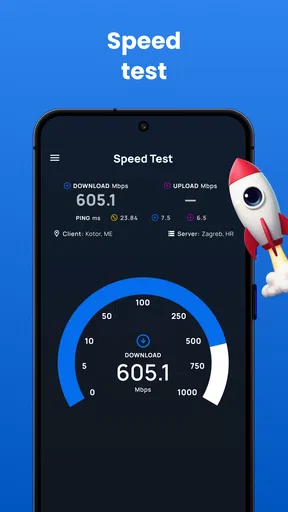
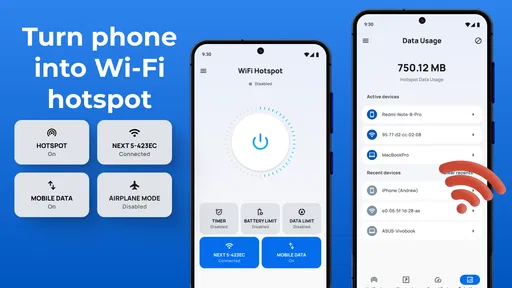
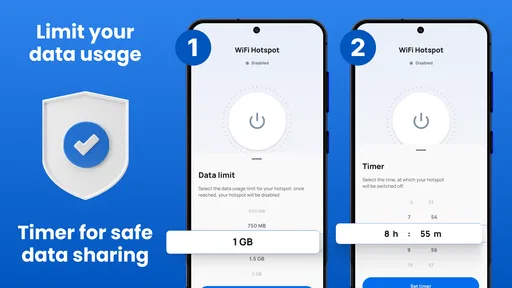
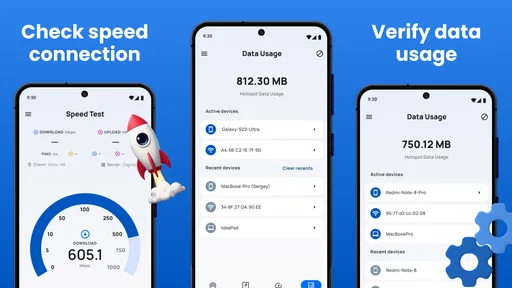
Our Review of Portable WiFi - Mobile Hotspot
 Analysis by Appyee
I find Portable WiFi - Mobile Hotspot most useful when I need to share my phone’s mobile connection with another device and want a simple way to get started. It is a communication app from DOSA Apps, and its purpose is practical rather than elaborate: turn a phone into a hotspot when the situation calls for one. The key thing to keep in mind is that the app works alongside your phone and mobile plan; it is not a substitute for either.
What the free download does—and does not mean
The app is free to download, which makes it easy to try before deciding whether it suits your routine. It also offers in-app purchases, with items priced from $0.99 to $99.99. That range is worth noticing, but it does not tell me what each purchase contains or whether any particular one is useful. I would check the purchase details shown in the app before paying, rather than treating the free download as proof that every part of the experience is free.
That distinction matters because the basic value proposition is straightforward: the app helps you set up a hotspot, while the internet connection itself still depends on your carrier and its tethering terms. Your mobile data plan may have limits, and using a laptop or tablet can consume data faster than casual phone browsing. I’d check the plan first, especially before relying on a hotspot for work or video calls.
Where the convenience comes from
The useful part is having a direct route from “I need internet on this other device” to a shared connection. If I’m carrying a phone but don’t have access to familiar Wi-Fi, a hotspot can help me get a laptop online long enough to send a file, check a booking, or finish a small task. It is a practical backup, not a promise of faster service or broader coverage than the mobile network already provides.
There is also a useful distinction between sharing a connection and creating one. This app can help with the former, but it cannot conjure a signal where the phone has none. A weak mobile signal, a restricted plan, or a carrier that does not permit tethering can all limit the result. I would treat those as the first things to troubleshoot if another device cannot connect, rather than assuming the app alone controls every part of the process.
When another option may suit you better
For occasional sharing, a phone hotspot is often more convenient than carrying a separate hotspot device. It keeps the connection source in the phone you already have, which is handy for a short trip or an unexpected need. On the other hand, if several people need internet throughout a long day, a dedicated mobile router may be a better fit, depending on its plan, coverage, and battery. The right choice is less about the app’s name and more about how often you share and how much data you expect to use.
Built-in hotspot settings are another sensible comparison. Many people can already enable tethering through their phone’s system settings, so an extra app is most worthwhile if its approach feels clearer or more convenient on their device. If you already have a quick, dependable setup in the system menu, you may not gain enough to justify adding another tool. I’d try the app for the specific job you need, then keep whichever method is easier to manage.
Setting Up Your Personal Hotspot
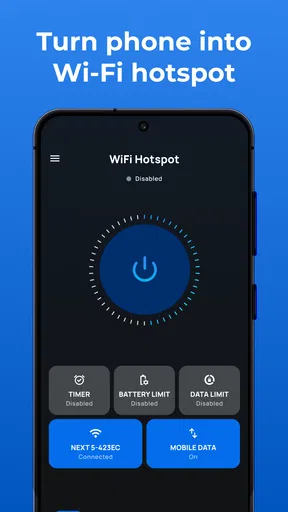
Getting started with Portable WiFi - Mobile Hotspot is a breeze. Once you download and install the app, you’re greeted with a user-friendly interface that’s as intuitive as it is functional. You simply tap a button, and voilà, you’ve converted your phone into a mobile hotspot. What I love about this app is its simplicity. No complicated configurations or tech jargon to navigate through. Just pure, straightforward functionality.
It’s worth noting that your carrier’s data plan needs to support tethering. But if you’ve got that sorted, you’re golden. The app runs smoothly on both Android and iOS, so no one’s left out of the loop. It’s like having your own personal WiFi router wherever you go.
Before you share your connection
My practical advice is to test the setup once at home or somewhere with time to troubleshoot, rather than waiting until you are in a rush. Check that the phone has mobile service, that tethering is allowed on your plan, and that the second device can see and join the hotspot. This small rehearsal makes the app more useful as a backup: you learn where the controls are before you need them for a work message or travel detail.
When sharing with a laptop, I’d also close background downloads and pause automatic updates if possible. A computer may quietly use data even when you are only trying to send one email. For a tablet, it can help to avoid high-resolution video until you know how much data the task is using. These habits do not change the app’s connection; they help you stay in control of the plan behind it.
Performance and Reliability
Let’s talk about performance. During my tests, the connection speed was consistently fast. I was able to browse the web, stream videos, and even play online games without a hitch. It’s like having a tiny, reliable router in your pocket. The app ensures that your device is used efficiently, so you’re not draining your battery faster than a kid in a candy store.
The connection reliability is impressive. I’ve used other hotspot apps in the past that were as unpredictable as the weather. But with this app, the connection stayed strong and stable, making it perfect for those impromptu work sessions at cafes or during travel.
What affects a real-world session
In day-to-day use, I would judge a hotspot by more than whether the first connection succeeds. The phone’s signal, the location, the carrier plan, and the second device all shape the experience. If a connection drops, I would first check whether the phone still has mobile data and whether the other device is still connected, then reconnect before changing several settings at once. That simple order makes it easier to identify whether the problem is the network or the local connection.
Hotspot use can also ask more of a phone than ordinary browsing. If I know I will be sharing for a while, I keep the phone somewhere with a stable signal and access to power when practical. I avoid treating a phone hotspot as an all-day home broadband replacement: it is better suited to filling gaps, getting a task done, or helping a second device briefly than to serving every device in a busy household.
Features That Stand Out
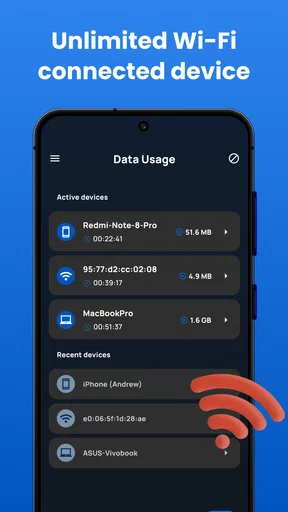
Now, let’s dig into some of the features that make this app stand out in the crowded app marketplace. First off, there’s a nifty data usage tracker that helps you keep tabs on how much data you’re burning through. This is especially handy if you’re on a limited data plan. It’s like having a little data guardian ensuring you don’t go overboard.
Security is another big plus. The app allows you to set up a password for your hotspot, ensuring that only your chosen devices can connect. No more worrying about random strangers piggybacking on your network. It’s a small feature, but it makes a world of difference.
Small habits that make sharing easier
A password is most useful when it is not left as an easy-to-guess default. I would choose one that is simple to enter on my own devices but not obvious to someone nearby, and share it only with the people who need access. When the session is over, turning the hotspot off is a tidy habit: it avoids leaving a shared connection available by mistake and helps me remember that the phone is still using mobile data.
The data tracker is most valuable when I use it as a prompt, not as a reason to stop checking my carrier plan. I might note the reading before a laptop session and check it again afterward to get a rough sense of the task’s impact. That is especially useful for a large attachment or a video call. For exact billing decisions, I would still rely on the account information from my carrier, since the app’s tracker is best treated as an in-app guide.
Who is likely to get the most from it?
I’d recommend trying it if you already have a phone plan that permits tethering and only need to connect another device now and then. It makes sense for a traveler checking a booking on a laptop, a student sending coursework from a place without usable Wi-Fi, or someone whose home connection has briefly failed and needs to complete one urgent task. In each case, the benefit is convenience; the phone and plan remain the limiting factors.
It is less compelling for someone who never shares mobile data, already finds the phone’s built-in hotspot controls easy, or needs a dependable connection for multiple people over long periods. If that describes you, the app may add little beyond a route to a feature you can already access, while a dedicated router or a fixed internet service may better match heavier use. I would also skip using any hotspot as a substitute for checking whether your plan allows tethering.
Why You’ll Love It
So, why is this app a must-have? For starters, its ease of use and reliability make it a top contender for anyone needing a portable internet connection. Whether you’re a frequent traveler, a busy professional, or just someone who loves staying connected, this app’s got you covered.
In terms of design, the app is sleek and modern. It doesn’t bombard you with ads or unnecessary clutter, which is a refreshing change. Everything is laid out clearly, making it easy to access the features you need without any fuss.
Who should pause before installing
The app is rated for Everyone, and its current version is 3.9.2. It was released on January 30, 2021, and requires Android 7.0 or later. Those details help set expectations about compatibility, but I would still check that the app is available and behaves as expected on the particular device I plan to use. A phone’s system settings and carrier restrictions can shape hotspot behavior even when the app itself installs successfully.
There is broad interest in the app: it has an average rating of 4.4 from around 89,000 ratings, with about 2,100 written reviews, and it has over 10 million installs. Those figures suggest many people have tried it, but they cannot tell me whether it will suit my phone, plan, or preferred way of sharing. I would use them as context, then make the decision based on a short test with my own devices.
The Final Verdict
All things considered, Portable WiFi - Mobile Hotspot is a gem of an app. It merges functionality with simplicity, ensuring that you’re always connected when you need it to be. It’s a reliable companion for anyone who values a seamless internet experience on the go.
If you’re looking for a dependable and easy-to-use mobile hotspot solution, I highly recommend giving this app a spin. It’s like having your own pocket-sized internet hub ready to spring into action whenever you need it. So go ahead, download it and take it for a test drive. You won’t be disappointed!
My buy-or-skip call
My verdict is a measured yes for occasional tethering, especially if you want a straightforward way to share a phone connection and the built-in controls do not suit you. The free download lowers the barrier to trying it, while the in-app purchase range means I would look carefully at any paid option before deciding it adds value for my needs. I would not pay simply on the assumption that a purchase improves coverage, speed, or data allowance; those depend on the phone network and plan, not a hotspot app alone.
For someone who needs a one-off connection in a station, at a café, or during a short work interruption, the app can be a convenient tool to keep available. For daily heavy sharing, a tethering plan designed for that use or a dedicated internet option is a better place to compare costs and reliability. I’d install it if that occasional-use case sounds familiar, test it before relying on it, and skip it if your current phone settings already do the job without friction.
Verdict
Strengths of Portable WiFi - Mobile Hotspot
- Easy setup and user-friendly interface.
- Supports multiple device connections.
- No additional hardware required.
- Customizable network name and password.
- Works with both Android and iOS devices.
Limitations of Portable WiFi - Mobile Hotspot
- Limited functionality in free version.
- May drain battery quickly on some devices.
- Connection speed varies with distance.
- Requires mobile data for internet access.
- Potential security risks if not secured.
Other Releases by DOSA Apps
View All
Cube Cipher - Cube Solver
Educational4.5

Recover Deleted Photos App
Photography4.4

Cleanup Your Phone
Personalization4.5

Microphone Amplifier
Medical4.2
Similar Picks in This Category
View All
Google Messages
Google LLC4.6

Gmail
Google LLC4.1

Google Meet
Google LLC4.4

Google Chrome
Google LLC4.1

WhatsApp Messenger
WhatsApp LLC4.6

Carrier Services
Google LLC4.2
Frequently Asked Questions
How do I set up Portable WiFi - Mobile Hotspot on my device?
Setting up Portable WiFi - Mobile Hotspot is straightforward. First, download and install the app from the Google Play Store or Apple App Store. Open the app, and follow the on-screen instructions to configure your hotspot. You’ll need to set a network name (SSID) and password for security. Once configured, activate the hotspot to start sharing your internet connection with other devices.
Is Portable WiFi - Mobile Hotspot secure for sharing my internet connection?
Yes, Portable WiFi - Mobile Hotspot offers several security features to ensure safe internet sharing. Users can set a strong password and enable WPA2 encryption to protect the connection from unauthorized access. It is important to regularly update the app and change passwords periodically to maintain security.
Will using Portable WiFi - Mobile Hotspot affect my mobile data plan?
Yes, using Portable WiFi - Mobile Hotspot will consume data from your mobile plan. It’s important to monitor your data usage to avoid exceeding your plan's limit, which could result in additional charges. The app may offer data usage tracking tools to help you manage your consumption effectively.
Can Portable WiFi - Mobile Hotspot support multiple devices at once?
Portable WiFi - Mobile Hotspot can support multiple devices, though the number may vary based on your smartphone's capabilities and mobile carrier restrictions. Typically, you can connect up to 10 devices. However, performance may decrease as more devices are connected, affecting speed and stability.
What should I do if Portable WiFi - Mobile Hotspot is not working properly?
If Portable WiFi - Mobile Hotspot is not functioning correctly, try restarting your device and ensuring that the app is updated to the latest version. Check if your mobile data is active and your plan allows tethering. If issues persist, consult the app's support section or contact customer support for assistance.
